Every event registration system demo looks flawless. The QR code scans, the dashboard glows, the sales rep smiles. Then event day arrives, and you find out which tool was built for real crowds and which was built for demos.
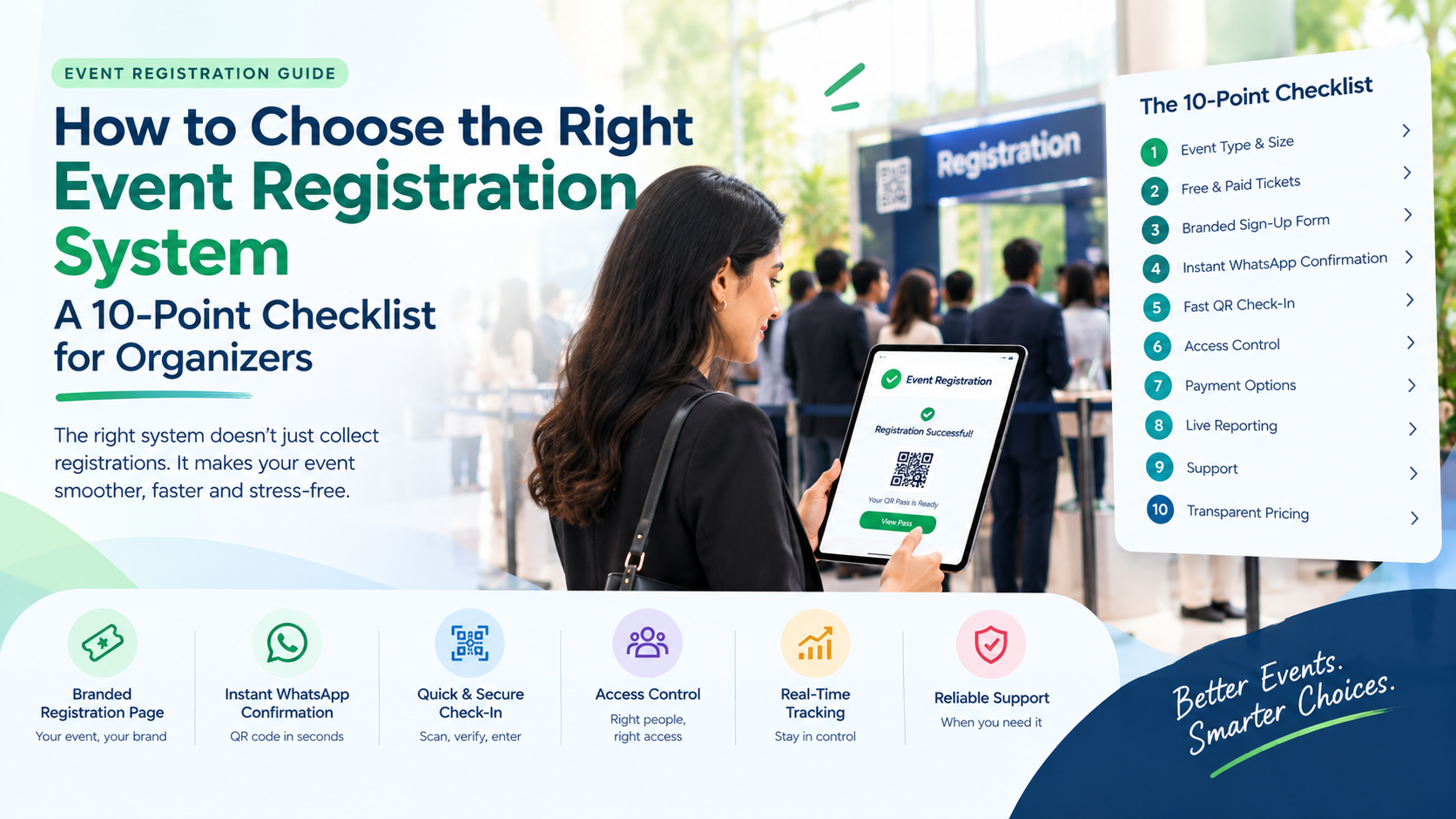
To choose well, score each tool against ten practical points: fit for your event type, flexible tickets, a short sign-up form, instant WhatsApp confirmation, fast QR check-in, access control, payment options, live reporting, support and transparent pricing. Then test a real scan before you pay.
This checklist walks through all ten, with the question to ask and the red flag to watch for.
How Do You Choose the Best Event Registration System for Your Event?
Choose the best event registration system by matching its features to your event’s size, ticket types, payment habits and gate setup, then testing it end to end. A tool that handles your busiest ten minutes smoothly will handle everything else too.
Before you open a single demo, write down three things:
- How many guests you expect
- Which ticket types you will sell or issue
- How your guests pay and how they prefer to be contacted
Without these, you are comparing features in a vacuum.
The 10-Point Checklist
For each point, use the Ask, Why it matters and Red flag lines in your vendor calls.
1. Does it fit your event type and size?
- Ask: Is this event registration software built for events like mine, such as workshops, seminars, concerts or conferences?
- Why it matters: A tool built for ten-person webinars struggles with a 2,000-guest gate.
- Red flag: The vendor cannot name a similar event it has supported.
2. Can it handle free and paid tickets?
- Ask: Can I run free guests and several paid categories in one setup?
- Why it matters: Most real events mix ticket types, and switching tools halfway is painful.
- Red flag: Paid tickets need a separate tool or manual reconciliation.
3. Is the sign-up form short and brandable?
- Ask: Does the event signup software let me keep the form short and add my own logo and colours?
- Why it matters: Every extra field loses sign-ups, and a branded page builds trust.
- Red flag: A fixed, generic form you cannot adjust.
4. Does it confirm instantly, where guests actually look?
- Ask: Is confirmation automatic, and does it reach guests on WhatsApp?
- Why it matters: Guests who wait for confirmation start doubting the event, and many never open email.
- Red flag: Your team must send confirmations by hand.
5. Is check-in a scan, not a search?
- Ask: Does each guest get a unique QR code, and how fast is a scan at the gate?
- Why it matters: A good event registration system turns check-in into a scan, so queues stay short even when everyone arrives together.
- Red flag: The vendor will not let you test a real scan before you buy.
Want to test a real scan before you decide? Talk to the AccessEase team at accessease.in for a quick walkthrough.
6. Can access rules sit on the pass?
- Ask: Can dining, VIP or zone access be linked to each guest’s QR code?
- Why it matters: Rules enforced by the system stop counter arguments and second checks.
- Red flag: Access is just a note in a spreadsheet column.
7. Does it support how your guests actually pay?
- Ask: Can I record both online and cash registrations?
- Why it matters: Many Indian events still see cash sign-ups, and ignoring them means keeping a second list.
- Red flag: Online payment only, with no plan for cash guests.
8. Do you get live numbers?
- Ask: Can I see registrations and check-ins in real time?
- Why it matters: Live data lets you add a scanning lane before a queue forms and shows turnout while you can still act.
- Red flag: Reports arrive only as exports after the event.
9. What does support look like on event day?
- Ask: Who do I contact when something breaks during the event, and how fast do they respond?
- Why it matters: Problems appear when events are live, not during setup.
- Red flag: Support exists only by email during office hours.
10. Is pricing clear and does it scale?
- Ask: What exactly do I pay for my event size, and what changes if I grow?
- Why it matters: Registration softwares price in different ways, such as by event size, registrations, features or support level, so headline rates rarely tell the full story.
- Red flag: Fees that only appear after you launch, such as extra charges on paid tickets or for support.
Your Scoring Sheet
Rate each tool from 1 to 5 on every point above. This is a simple guideline, not a formula:
| Total score (out of 50) | What it suggests |
| 40 and above | Strong fit, worth a trial |
| 30 to 39 | Workable, but check the weak points |
| Below 30 | Keep looking |
Score each tool separately, and ask a teammate to score it too. Disagreements usually reveal which point matters most to you.
Which Event Registration Platforms Suit Which Event?
Different events stress different points on the checklist. Use this as a starting map:
- Small teams and one-day workshops: prioritise quick setup, a simple form, WhatsApp confirmation and clear pricing (points 3, 4 and 10).
- Paid seminars and launches: prioritise ticket categories, payment handling and branding (points 2, 3 and 7).
- Conferences and large gatherings: prioritise QR scan speed, access rules, live reporting and support (points 5, 6, 8 and 9).
Small teams should compare event registration platforms on how little effort they need to run, since nobody on a small team has time to babysit software.
Common Mistakes When Choosing
Common Mistake: Picking an event registration system on price alone, then discovering its limits during your busiest week.
- Skipping the test scan. Always try a real sign-up and a real scan.
- Comparing features, not outcomes. Ask what the gate looks like at your peak arrival time.
- Ignoring local habits. Many registration softwares assume email and card payments, while your guests use WhatsApp and cash.
- Forgetting support. The best tool is useless if nobody answers when it breaks.
- Overbuilding the form. More fields mean fewer sign-ups.
How AccessEase Measures Up Against the Checklist
AccessEase is event registration software built around how events actually run, so organisers do not have to change how they work. A small meet-up may need only free sign-ups, while a concert may need several paid ticket categories.
As an event registration system, AccessEase covers the checklist points like this:
- Free and paid events: multiple paid ticket categories, with online and cash registrations (points 2 and 7).
- Branded sign-up page: a registration experience that matches your event (point 3).
- Instant QR passes: a unique code per guest, delivered on WhatsApp (points 4 and 5).
- Access control: privileges such as dining linked to each guest’s code (point 6).
- Real-time analytics: registrations and check-ins tracked as they happen (point 8).
- Integrations and support: it fits your existing tools, with a team to help (point 9).
For pricing (point 10), the best route is a direct conversation, since your event size and needs decide the cost.
Ready to run this checklist against AccessEase? Visit AccessEase and book a demo.
Conclusion
Choosing the right event registration system comes down to ten honest checks and one real test scan. Match the tool to your event type, keep forms short, confirm on WhatsApp, insist on fast QR entry and access control, and read the pricing and support terms closely. AccessEase brings free and paid sign-ups, WhatsApp QR codes, access control and live tracking into one platform. Do that homework, and the gate becomes the easiest part of your event. Ready to compare? Visit AccessEase and book a demo.
Frequently Asked Questions
Which event registration software has the best features for conferences and workshops?
The best event registration software for conferences and workshops offers multiple ticket categories, access rules linked to each pass, fast QR check-in and live attendance reports. AccessEase supports free and paid tickets, access privileges tied to each QR code, and real-time tracking. Always compare shortlisted tools with a real test scan.
What features should event signup software have?
Event signup software should offer a short branded form, free and paid ticketing, instant confirmation, unique QR codes, access control and live reporting. AccessEase includes a branded registration page, WhatsApp QR delivery, online and cash registrations, and real-time analytics, so one tool covers everything from sign-up to check-in.
How do registration softwares compare on pricing?
Registration softwares usually price by event size, number of registrations, features and support level, so compare the total cost for your own event rather than headline rates. Watch for extra fees on paid tickets and for support. For AccessEase, contact the team for a quote matched to your event.